Token Management
This section provides information about sample calls of how to follow the OAuth2.0 Authorization Code Flow.
It will provide information on how to generate an authorization code, exchange the authorization code to a token such as access token, refresh token and id token, and utilize the access token to call our APIs.
It will also show how to use a refresh token to get a new access token.
Generating an Authorization Code
Generate an Authorization Code by redirecting your customer to our universal login page.
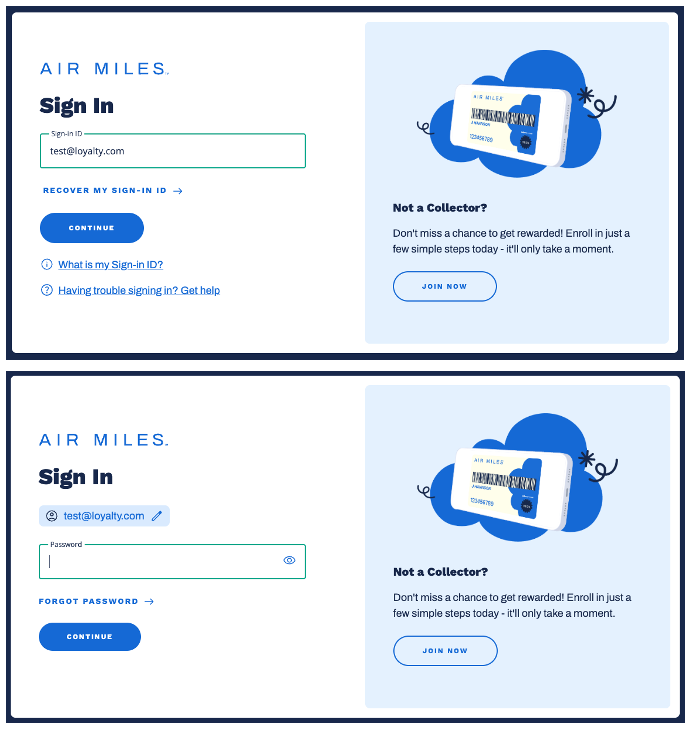
(Fig. 1) AIR MILES universal log in page
Sample Authorization Request
<a href="https://oauth-cert.airmiles.ca/authorize?
    client_id=knPgPn56gZhdFEIZV27QevLkx&
    response_type=code&
    connection=member-email-idp-recaptcha&
    redirect_uri=https://your_redirect_uri/callback&
    scope=collector%3Asummary%3Aread%20offline_access&
    audience=loyalty-api">
  Sign In
</a>
| Parameter | Description |
|---|---|
client_id |
To be provided by AIR MILES. |
response_type |
Do not change, keep as code. |
connection |
Do not change, keep as member-email-idp-recaptcha. |
redirect_uri |
The URL which Auth0 will redirect the browser to, and send the authorization code.
Note The address must be a valid callback URI, and needs to be communicated to AIR MILES at the same time yourclient_id is being setup.
|
scope |
Summary API requires scope collector:summary:read.Profile API requires scope collector:profile:read.Enrollment API requires scope collector:enrollment:write. Note Theoffline_access scope enables the use of Refresh Tokens and is optional
|
audience |
To be provided by AIR MILES. |
Sample Authorization Response
Once your customer authenticates themselves, a response will be sent to the redirect URI that includes an Authorization Code.
HTTP/1.1 302 Found
Location: https://your_redirect_uri/callback?code=6hgDftTGH656HEDLdfOPA43nmsR5GuqG
Exchange Authorization Code to Token
An Access Token is required to communicate with the Collector Service API.
To generate an Access Token (aka JSON Web Token), make an API request like the one shown below.
WARNING
The exchange authorization code to token request MUST originate from your backend in order to maintain the security of the OAuth2.0 Authorization Code Exchange.If the request originates from a web browser this means your
client_secret has been exposed to the public, at which point you MUST IMMEDIATELY let Airmiles Partner Ops know and request a new client secret.
Sample Token Request
curl --request POST \
  --url 'https://oauth-cert.airmiles.ca/oauth/token' \
  --data-urlencode 'grant_type=authorization_code' \
  --data-urlencode 'client_id=knPJldKv8ygPn5ZV27QevLkx' \
  --data-urlencode 'client_secret=lfgdFGDF454FdDFffdl7h8J43s' \
  --data-urlencode 'code=6hgDftTGH656HEDnmsR5GuqG' \
  --data-urlencode 'redirect_uri=https://your_redirect_uri/callback'
| Parameter | Description |
|---|---|
grant_type |
Do not change, keep as authorization_code. |
client_id |
The client_id used in the previous step. |
client_secret |
To be provided by AIR MILES. |
code |
The Authorization Code (i.e., code) returned in the last step. |
redirect_uri |
The redirect_uri used in the previous step. |
Sample Token Response
If all goes well, you’ll receive a (HTTP 200) JSON response with a payload containing an access_token, refresh_token, id_token, and token_type.
{
  "access_token": "eyJz93a409sSwFG8kkIL2qsGHk4laUWw",
  "refresh_token": "GE5g5HJdbYb47HN358polTHdf3tHf3ra",
  "id_token": "eyKMD32ldkgfkDYKL4h6hf33edHGSDKk",
  "token_type": "Bearer"
}
Notes on Refresh Tokens
- The
refresh_tokenwill only be present in the response if you included theoffline_accessscope. - Refresh Tokens must be stored securely since they allow a user to remain authenticated essentially forever.
JSON Web Token (JWT) structure
The JWT consists of three concatenated Base64url-encoded strings, separated by dots “.”.
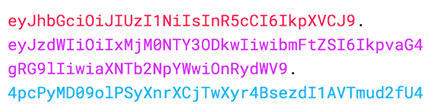
(Fig. 2) JWT Example
| String | Description |
|---|---|
| Header | Contains metadata about the type of token and the cryptographic algorithms used to secure its contents. |
| Payload | Contains verifiable security statements, such as the Collector ID and the allowed scopes. |
| Signature | Used to validate that the token is trustworthy and has not been tampered with. |
Calling the Collector Service API
Finally, for instance, to display the Collector’s summary, make an API request using the Access Token received in the previous step.
Sample API Request
curl -X GET \
  `https://cert.airmilesapis.ca/collectors/:collector-number/summary` \
  -H 'Authorization: Bearer eyJz93a409sSwFG8kkIL2qsGHk4laUWw' \
Tip
Make sure to include the wordBearer before the token, as shown in the example above.
Using a Refresh Token
Typically, a user needs a new access token when gaining access to a resource for the first time, or after the previous access token granted to them expires.
A refresh token is a special kind of token used to obtain a renewed access token.
You can request new access tokens until the refresh token is blacklisted.
Applications must store refresh tokens securely because they essentially allow a user to remain authenticated forever.
Note
To successfully obtain a refresh token, you must first have included theoffline_access scope when you initiated your authentication request through the ../authorize endpoint, as shown in Step 1.
To exchange the Refresh Token you received during authorization for a new Access Token, make a POST request to https://oauth-cert.airmiles.ca/oauth/token, using grant_type=refresh_token as seen in the example below.
Important
You should only ask for a new token if the access token has expired or you want to refresh the claims contained in the ID token.
For example, it’s bad practice to call the endpoint to get a new access token every time you call an API.
There are rate limits in Auth0 that will throttle the number of requests to this endpoint that can be executed using the same token from the same IP.
Sample ‘Refresh Token’ Request
curl --request POST \
  --url 'https://oauth-cert.airmiles.ca/oauth/token' \
  --header 'content-type: application/x-www-form-urlencoded' \
  --data grant_type=refresh_token \
  --data-urlencode 'client_id=knPJldKv8ygPn56gZhdFEIZV27QevLkx' \
  --data-urlencode client_secret=lfgdFGDF456fFDFV4FdDFffdl7h8J43s \
  --data refresh_token=YOUR_REFRESH_TOKEN
| Parameter | Description |
|---|---|
grant_type |
Do not change, keep as refresh_token. |
client_id |
To be provided by AIR MILES. |
client_secret |
To be provided by AIR MILES. |
refresh_token |
The Refresh Token to use. |
Note
The scopes requested in the initial request are included by default in the Refresh Token.Sample ‘Refresh Token’ Response
If all goes well, you’ll receive an HTTP 200 response with a payload containing a new access_token, its lifetime in seconds (expires_in), granted scope values, and token_type. If the scope of the initial token included openid, then the response will also include a new id_token:
The response will include a new Access Token, its type, its lifetime (in seconds), and the granted scopes.
The scope used in the request scope should also be included in the response as well.
{
  "access_token": "eyJz93a409sSwFG8kkIL2qsGHk4laUWw",
  "scope": "collector:summary:read offline_access",
  "id_token": "eyKMD32ldkgfkDYKL4h6hf33edHGSDKk",
  "token_type": "Bearer"
}