The purpose of this documentation is to provide a guide on how to integrate with the AIR MILES Collector Service API.
As part of this documentation it’s included information on RESTful HTTPS requests/responses and error codes for each endpoint.
Target audience
This material is intended to be used by a Partner wishing to integrate with the AM Collector Service API.
What is the Collector Service API?
The Collector Service API provides REST-based services for enrolling new members and looking up the profile and summary information of existing members.
Integration environments
There are two sets of environments used by partners to integrate with the real-time checkout platform. These environments are configured similarly for consistent production-level quality, whether the partner has deployed to production or is still performing non-production testing.
In preparation for launch, an AIR MILES team is pulled together to assist Partners with integration and setup. This team will provide the following services:
Consulting Partners on the best technical solution to support AIR MILES Issuance based on system compatibility.
Providing guidance for assessing Partner requirements, data exchange methods, and reconciliation.
As well as overseeing a broad range of activities to meet the requirements of launch, including:
Planning
Communications
Delivery
Execution
Monitoring
1 - Authentication & Authorization
The AIR MILES security layer granting access to member APIs and associated services.
For more information on “Auth0” and the various authentication flows, click the button below.
2 - Token Management
This section provides information about sample calls of how to follow the OAuth2.0 Authorization Code Flow.
It will provide information on how to generate an authorization code, exchange the authorization code to a token such as access token, refresh token and id token, and utilize the access token to call our APIs.
It will also show how to use a refresh token to get a new access token.
Generating an Authorization Code
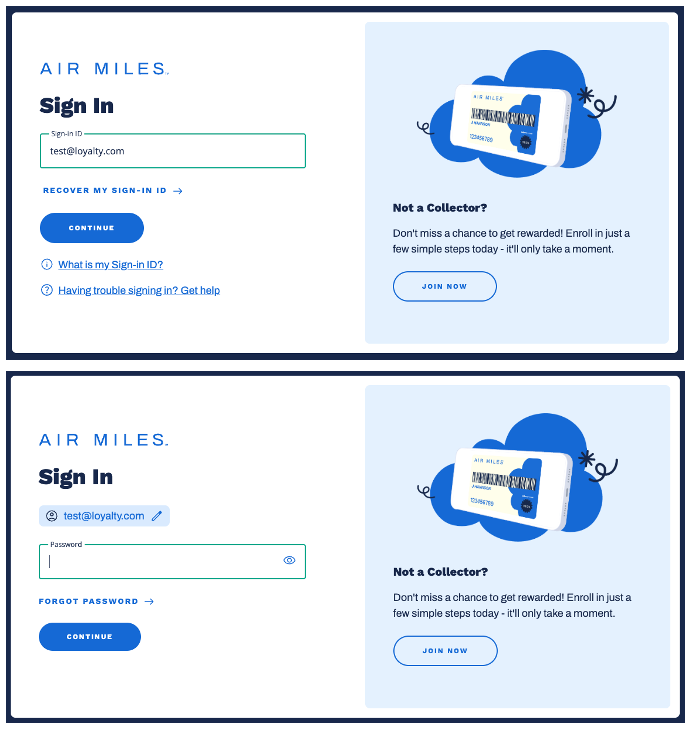
Generate an Authorization Code by redirecting your customer to our universal login page.
(Fig. 1) AIR MILES universal log in page
Sample Authorization Request
<ahref="https://oauth-cert.airmiles.ca/authorize?
client_id=knPgPn56gZhdFEIZV27QevLkx&
response_type=code&
connection=member-email-idp-recaptcha&
redirect_uri=https://your_redirect_uri/callback&
scope=collector%3Asummary%3Aread%20offline_access&
audience=loyalty-api">
Sign In
</a>
Parameter
Description
client_id
To be provided by AIR MILES.
response_type
Do not change, keep as code.
connection
Do not change, keep as member-email-idp-recaptcha.
redirect_uri
The URL which Auth0 will redirect the browser to, and send the authorization code.
Note
The address must be a valid callback URI, and needs to be communicated to AIR MILES at the same time your client_id is being setup.
scope
Summary API requires scope collector:summary:read. Profile API requires scope collector:profile:read. Enrollment API requires scope collector:enrollment:write.
Note
The offline_access scope enables the use of Refresh Tokens and is optional
audience
To be provided by AIR MILES.
Sample Authorization Response
Once your customer authenticates themselves, a response will be sent to the redirect URI that includes an Authorization Code.
HTTP/1.1 302 Found
Location: https://your_redirect_uri/callback?code=6hgDftTGH656HEDLdfOPA43nmsR5GuqG
Exchange Authorization Code to Token
An Access Token is required to communicate with the Collector Service API.
To generate an Access Token (aka JSON Web Token), make an API request like the one shown below.
WARNING
The exchange authorization code to token request MUST originate from your backend in order to maintain the security of the OAuth2.0 Authorization Code Exchange.
If the request originates from a web browser this means your client_secret has been exposed to the public, at which point you MUST IMMEDIATELY let Airmiles Partner Ops know and request a new client secret.
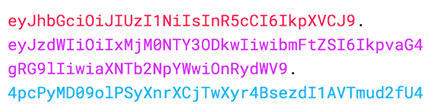
Used to validate that the token is trustworthy and has not been tampered with.
Calling the Collector Service API
Finally, for instance, to display the Collector’s summary, make an API request using the Access Token received in the previous step.
Sample API Request
curl -X GET \
`https://cert.airmilesapis.ca/collectors/:collector-number/summary`\
-H 'Authorization: Bearer eyJz93a409sSwFG8kkIL2qsGHk4laUWw'\
Tip
Make sure to include the word Bearer before the token, as shown in the example above.
Using a Refresh Token
Typically, a user needs a new access token when gaining access to a resource for the first time, or after the previous access token granted to them expires.
A refresh token is a special kind of token used to obtain a renewed access token.
You can request new access tokens until the refresh token is blacklisted.
Applications must store refresh tokens securely because they essentially allow a user to remain authenticated forever.
Note
To successfully obtain a refresh token, you must first have included the offline_access scope when you initiated your authentication request through the ../authorize endpoint, as shown in Step 1.
To exchange the Refresh Token you received during authorization for a new Access Token, make a POST request to https://oauth-cert.airmiles.ca/oauth/token, using grant_type=refresh_token as seen in the example below.
Important
You should only ask for a new token if the access token has expired or you want to refresh the claims contained in the ID token.
For example, it’s bad practice to call the endpoint to get a new access token every time you call an API.
There are rate limits in Auth0 that will throttle the number of requests to this endpoint that can be executed using the same token from the same IP.
The scopes requested in the initial request are included by default in the Refresh Token.
Sample ‘Refresh Token’ Response
If all goes well, you’ll receive an HTTP 200 response with a payload containing a new access_token, its lifetime in seconds (expires_in), granted scope values, and token_type. If the scope of the initial token included openid, then the response will also include a new id_token:
The response will include a new Access Token, its type, its lifetime (in seconds), and the granted scopes.
The scope used in the request scope should also be included in the response as well.
Developer information about Enrollment endpoint of Collector Service API
Enrollment endpoint
This operation processes an enrollment request.
It will take full PII or partial PII and create an AM account.
This endpoint can be called for multiple use cases. Please contact Partner Support partnersupport@loyalty.com for advice on what is mandatory for each use case.